
AI technology is rapidly becoming the backbone of business operations. It redefines how business operates by introducing automation across various processes.
As AI workflows take center stage in operations, businesses are increasingly finding it necessary to closely monitor security and compliance. This is because workflows handle sensitive customer data, and without proper security in AI workflows, it can expose you to data breaches and risks.
The AI workflows must be transparent for organizations to achieve smart automation. Microsoft addresses these challenges through Microsoft Copilot Studio and its integration with Dynamics 365.
We explore how organizations can make sure security and compliance in AI workflows
AI workflows deal with sensitive business data. Therefore, proper controls must be in place to prevent data breaches and protect customer trust. Organizations must prioritise data protection, responsible AI practices, regulatory compliance, and secure deployment of AI agents.
Microsoft AI solutions help organizations adopt AI with confidence.
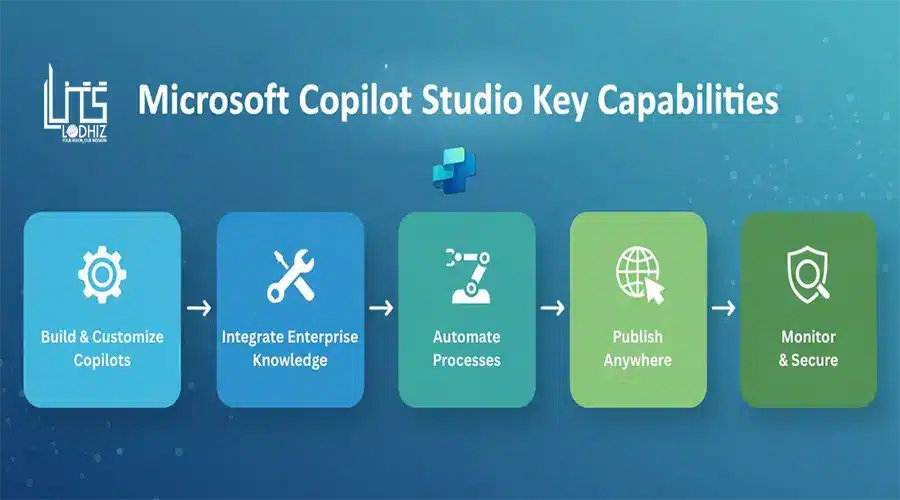
Microsoft AI solutions are a range of tools and services that helps organizations manage AI responsibly and securely. Microsoft Copilot Studio let users build secure AI agents for meeting specific business processes. These secure AI agents follow Microsoft security standards which facilitate businesses to safely use AI for automation and productivity.
Here we start:
Microsoft Copilot Studio plays a crucial role in making sure security and compliance in AI workflows when used with Dynamics 365. The platform provides a governed robust framework for building Ai agents that interact with Dynamics 365 data and processes.
Secure Access to Dynamics 365 Data
Copilot Studio easily combines with Dynamics 365 while adhering to security standards. This makes sure that AI workflows operate safely within the business environment.
AI agents do not have unrestricted access to data. Access is permitted based on the permissions and restrictions defined for users in Dynamics 365. These security measures cover role-based access control which limits access for each AI agent based on roles and Microsoft Entra ID which facilitates secure authentication.
Together. these security mechanisms make sure that AI agents can execute their tasks such analyzing data, automating processes, and giving insights without compromising business data.
Governance and Control
Copilot Studio clearly defines who is authorised to create and deploy AI agents. This makes sure that not everyone has access to AI agents. Access and control over AI agents are assigned based on job roles within the organization.
AI workflows are controlled according to organization’s rules and standards. In essence AI workflows comply with company’s security and compliance policies, AI agents undergo approval stages before they are deployed, and AI usage is guided by clear rules. All these makes sure that Copilot Studio prevent unlawful AI usage.
Data Protection and Compliance alignment
AI workflows adhere to Microsoft’s compliance framework to meet data standards and regulatory requirements. This creates a secured and controlled environment within the business.
Copilot Studio makes sure that the Dynamics 365 data being accessed aligns with applicable protection standards. This improved compliance framework let AI workflows to operate securely and safely. It creates a business environment where there is reduced risk of unauthorized data access and works in line with Microsoft AI compliance.
Another aspect that underpins meeting the compliance is that AI workflows generates logs. These logs let organizations understand how AI agents interact with data. This supports transparency and accountability in internal reviews, external audits, and regulatory reporting. Together these capabilities let organizations deploy AI workflows confidently to support their specific operational needs.
Responsible AI and Transparency
Copilot Studio follows Microsoft’s responsible AI principles. This means AI agents generated through Copilot behave in a transparent and trustworthy manner.
Organizations can monitor how AI agents interacts in real-time and respond to users. This help users understand AI behavior, identify issues, and make changes for consistency and accuracy. Users can apply rules to define how AI agents operate. This helps organizations shape agents to work as expected with business objectives and brand values. This is extremely valuable in customer-centric operations where trust and transparency are important.
Secure AI Automation
Copilot Studio integration with Dynamics 365 data facilitates AI automation across business functions such as sales, finance, and operations. AI agents created through Copilot Studio can be used for automation of complex workflows by utilizing D365 data.
These secure AI agents assist with automating tedious tasks across sales and customer service. They can also be created and managed to automate approval workflows, analyze transactions, and provide insights. AI agents here work within the predefined security controls and compliance policies.
Copilot Studio makes sure that AI workflows improve productivity without posing any risks. Organizations can scale AI adoption through Copilot Studio with Dynamics 365 ERP.
Want to create a secure AI workflow within Dynamics 365 application?
LITS SERVICES sets a transformative path across business processes with Microsoft AI solutions. Microsoft Copilot has proven effective, particularly when combined with Dynamics 365. It drives growth through secure business automation across processes, insights generation, and contextual guidance.
The integration of Copilot Studio with Dynamics 365 creates an environment where you can use AI for automation, decision-making, and performance improvements while maintaining strict data security.
Our professionals help you accelerate transformation using Microsoft Copilot Studio. To learn more about how Copilot Studio with Dynamics 365 can support growth, connect with our D365 consultants today.
FAQ Section
What is Microsoft Copilot?
Microsoft Copilot is an AI tool that features AI capabilities to improve business performance and creativity. This AI assistant let users automate tasks, generate insights, and create content for sales and marketing purposes.
What is Microsoft Copilot Studio?
Copilot Studio is a platform within Copilot that help users create secure AI agents that connects to business data and automate tasks. AI agents let users interact with Copilot AI using natural language, without extensive coding skills.
Does Copilot work with Dynamics 365?
Yes, Copilot combines with Dynamics 365 to help users work efficiently using AI assistance. It also combines with Microsoft 365, Power Platform, Azure, and third-party applications.